
Great lighting = great skin on camera. You don’t need a studio: one soft key light, a simple bounce, warm tone, and a tidy background can transform how your face looks on video. This is a repeatable, two-minute home lighting for better skin workflow you can rebuild anytime.

Key light at 45° (soft, eye level)
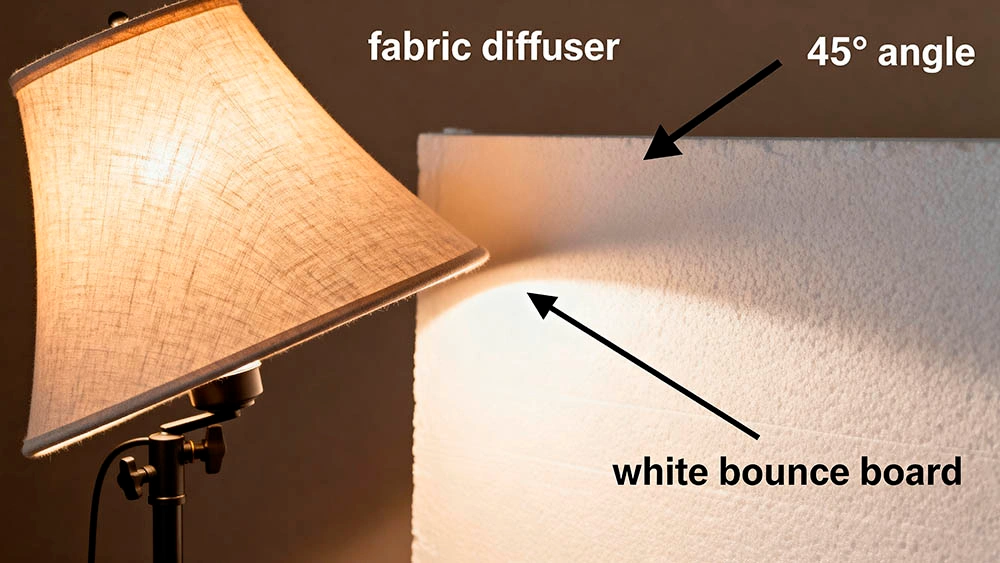
Place your main light slightly above eye level, about 45° off to one side of your face. The goal is softness that smooths texture, not a harsh beam that highlights pores. If you don’t have a softbox, improvise: a lampshade, a white T‑shirt, or sheer fabric can work as diffusion. The closer the light (within reason), the softer the look. Angle it until you see a gentle cheek highlight and a small catchlight in your eyes.
Bounce instead of a second lamp
Skip the symmetrical ‘two headlights’ look. On the shadow side, bounce your key into a white wall, a foam board, or even A4 paper taped to cardboard. This fills under‑eye shadows and evens tone without flattening your features. A bounce is cheap, fast, and looks more natural than a second direct lamp.
Warm tone for healthier skin (3000–4000K)
Cool bulbs (5000–6500K) tend to grey out skin; overly warm (<2700K) can go orange. Aim for 3000–4000K — that ‘evening sun’ warmth that makes skin look alive. If your bulb is fixed, warm things up in camera/app and adjust your warm white balance for skin. Keep it consistent from call to call so your look is predictable.
Kill shine, keep glow
Shiny hotspots read as ‘webcam glare’. Quick fix: blot your T‑zone with oil‑absorbing paper or a tissue, then slightly lower brightness and add diffusion. You want glow (soft highlights) without mirror‑like patches on forehead or nose. Tilt the light a touch to avoid bouncing directly off the oiliest areas.
Background control for a pro look
Busy backgrounds scatter light and steal attention from your face. Keep it simple: a plain wall, a shelf with two or three items, or a soft lamp in the distance. Step 1–1.5 meters away from the wall; that extra depth lets your face stay crisp while the background softens. Pair this with style tweaks for men to look put‑together without effort.
Camera placement that flatters skin
Put the camera just above eye level and a little further than arm’s length. Too close exaggerates texture; too far kills presence. Slightly tilt the lens downward to help your jawline and reduce neck shadows. Check framing: a bit of headroom, shoulders in view, eyes on the top third line. Strong eye contact in video chats helps the whole face feel more alive on camera.

Home lighting for better skin — two‑minute checklist
- Key light on, diffused, ~45° to face, just above eye level.
- Bounce on the shadow side (white wall/foam board), no harsh lines.
- White balance set warm‑neutral (roughly 3000–4000K target).
- Blot T‑zone; adjust light angle to avoid hotspots.
- Step 1–1.5 m off the wall; background tidy, one accent light ok.
- Camera slightly above eyes; micro‑smile, calm breath — roll.
Quick, low‑cost upgrades
- A larger diffuser (or closer light) for even softer skin.
- A foldable white reflector/foam board as permanent bounce.
- A dimmable bulb in the 3000–4000K range for precise warmth.
- A matte, non‑gloss wall behind you to control reflections.
Better skin on camera: final checks
Most of the ‘expensive skin’ look on camera comes from softness, angle, warmth, and a clean background — not from pricey gear. Build this home lighting for better skin routine once and reuse it before every call. If you try the setup, drop your tweaks in the comments — what changed most for your skin on camera? For lighting theory, try one-light interview setup (CineD quick tip), and for social presence, start an online chat with confidence so your first messages match your on‑camera confidence.